
The most common mistakes made when organizing multilingual events (and how to avoid them) >
The most common mistakes made when organizing multilingual events (and how to avoid them)
Organizing an event with simultaneous translation - whether it's an international conference, hybrid training, or a factory tour, requires a precise combination of audio technology, logistics, and human effort.
Mistakes can occur at every stage and affect every team member of the process: from the organizer, through the equipment supplier and interpreters, to the speakers and audience.
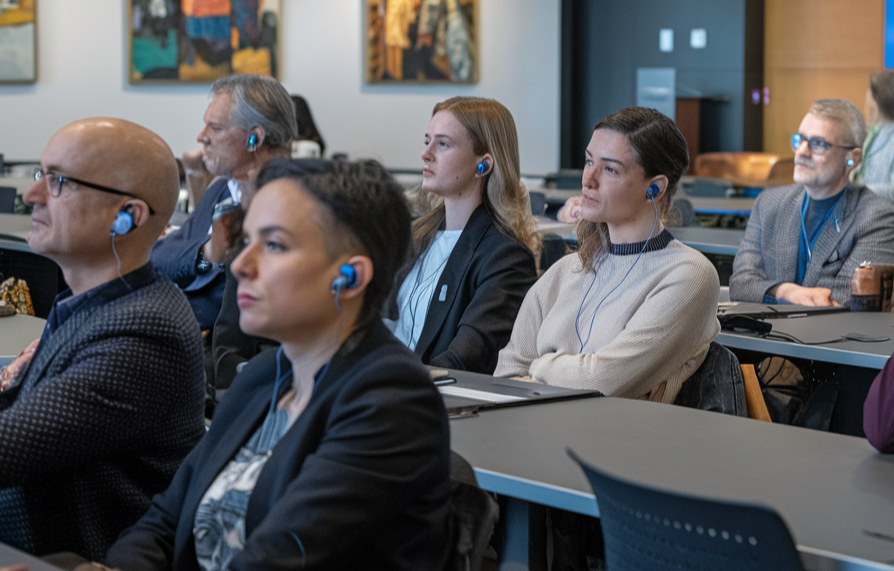
A successful multilingual event relies on the collaboration of five groups. The most frequent mistakes arise from a lack of good, precise communication between them: organizers fail to provide materials, suppliers deliver equipment that is not fully charged, interpreters work without a view of the stage, speakers talk too fast into the wrong microphone, and participants take receivers when leaving the conference room. The key to success is a clear division of responsibilities and a control procedure.
Are you looking for information on equipment configuration, infrared emitters, interpretation booths or a sound engineer?
Go to our Technical Guide on infrared emitters
Mistakes clssified by roles and responsibilities
1. Organizer (Client) Mistakes
The organizer is responsible for the overall vision, budget, and schedule. Their mistakes often stem from a lack of technical knowledge or last-minute planning, which can lead to:
-
Ordering technology and interpreters at the last minute:
- Choosing contractors just a few days before the event results in a lack of availability of high-quality interpreters and the necessity to use substitute equipment.
-
Lack of control over the distribution of headsets:
- The absence of a designated position and protocol for issuing equipment in exchange for an ID or deposit leads to the loss of 10 to 20% of receivers.
- GDPR errors during the registration of participants borrowing headsets.
-
Poor spatial layout of the room:
- Setting up the interpretation booth in a location without a direct view of the stage and speaker (or lack of HD video feed for interpreters in the interpretation booth).
-
Failure to provide materials for the interpreters:
- Not providing a glossary, agenda, and presentations to the interpreting team in advance.
-
Inappropriate choice of technology:
- Attempting to save costs by using mobile info points in a large, static conference room for multiple languages at once.
2. Equipment Supplier and Technical Support Errors
The supplier is responsible for the reliability of the audio signal and the physical condition of the devices. Errors at this level directly paralyze the course of the event.
These errors include:
-
Delivery of undercharged equipment:
- Failure to verify the condition of batteries in charging cases or lack of spare batteries in the room.
-
Lack of disinfection and hygienic covers:
- Issuing dirty headphones to participants without prior disinfection with 70% IPA alcohol or without disposable prtective covers.
-
Incorrect frequency configuration:
- Failure to scan the radio band in the venue in advance, leading to channel overlap (crosstalk) or interference from local WiFi networks and wireless microphones.
-
Lack of technician on - site:
- Leaving the organizer to fend for themselves during a complicated event (especially in hybrid scenarios and remote simultaneous interpretation).
-
Incorrect setup, insufficient number, and density of IR emitters:
- Too few emitters, improper placement, or lack of overlap between coverage areas causes dead spots and signal loss. This is particularly problematic in:
- high rooms (IR signal quickly loses strength with distance from the ceiling),
- rooms with large mirrors and glass surfaces (reflections cause multipath interference and uneven coverage),
- rooms with large windows and direct sunlight (interference from natural infrared radiation),
- dark rooms with obstacles (pillars, suspended screens, dense audience blocking the line of sight - IR is an optical system requiring direct visibility).
Consequence of bad planning:
Participants in some areas of the room lose the signal, hear crackling, or must constantly adjust receivers, which reduces the comfort and reliability of the entire translation system.
A site visit is one of the most effective ways to avoid most problems with IR emitters.
What exactly does a well-conducted site visit provide?
- Assessment of room geometry
- Ceiling height
- Arrangement of pillars, suspended screens, set design
- Presence of mirrors, large glass panes, metal surfaces
- Measurement and planning of coverage
- Determining the optimal number of emitters
- Their exact positions and angles of inclination
- Planning for overlap of areas to avoid dead zones
- Identification of interferences
- Impact of daylight / large windows
- Potential sources of heat or other IR emissions
- Places where the audience will block the line of sight
- Practical tests
- Ability to measure signal strength at key points in the room
- Checking if additional emitters or other solutions are needed (e.g., switching to a wireless system)
- Summary
Without a site visit, the supplier often operates "by guess" or based on drawings, which in atypical rooms (high, with mirrors, glassed-in) often results in poor reception. A site visit allows these errors to be identified and eliminated before installation.
- Too few emitters, improper placement, or lack of overlap between coverage areas causes dead spots and signal loss. This is particularly problematic in:
3. Errors by interpreters
The interpreter is a key link in the transmission of mesaages from speakers at an event. Even the best equipment won't help if the interpreter makes executional or procedural mistakes.
- Lack of substantive preparation:
- Working without prior familiarization with the specifics of the industry, abbreviations, and names of speakers ("improvisation" in s livr environment).
- Improper microphone handling in the booth:
- Too close positioning of the mouth (the effect of vocal "pops")
- Speaking too softly, which forces the audio technician to raise the microphone gain level which leads to background noises being heard over the earsets.
- Incorrect microphone positioning in the booth:
- Interpreter working in the same booth have microphones set at different angles or distances from their mouths. This causes noticeable differences in volume and tone with each handover (change of interpreter), which is very tiring for the listeners.
- Microphone directed at the side wall of the booth instead of towards the mouth:
Sound reflects off the wall, creating unpleasant echo and reverberation. Speech becomes less distinct, and listeners feel as if the interpreter is speaking from a distance. - Microphone directed upwards (above the interpreter's head):
The signal is noticeably quieter, and at the same time, there is echo and reverberation in the room. The technician has to significantly boost the sensitivity, which additionally introduces background noise. - Microphone directed downwards (towards the desk):
The microphone picks up the sounds of typing on the laptop keyboard, mouse clicking, and paper rustling intensely. These noises go directly into the participants' headsets. - Not using the Mute/Cough button:
Coughing, whispering, or private remarks transmitted directly into the participants' headsets.
- Jewelry generating noise:
Earrings (especially longer or metal ones) clink against each other or the head with every movement, causing metallic ringing audible in the language channel. - Headphone cable rubbing against clothing or jewelry:
With every head movement, the cable rubs against the blouse, sweater, or jewelry, generating characteristic rustling and crackling sounds that are very disturbing to the participants.
- Ignoring changes in the booth:
- Working alone for too long without switching with another interpreter (a drop in concentration after 30 minutes leads to a drastic increase in the number of errors as well as the flow and understaning of the interpretation).
- Working alone for too long without switching with another interpreter (a drop in concentration after 30 minutes leads to a drastic increase in the number of errors as well as the flow and understaning of the interpretation).
4. Speaker and Presenter Errors
The speaker has direct impact on how easily interpreters can convey their messages.
- "Too fast a pace" (Machine Gun):
- Reading text from notes or slides at a very fast pace without taking pauses to breathe.
- Improper use of the microphone:
- turning the head away from the lapel / desktop microphone towards the presentation screen,
- walking around the stage without a headset microphone or
- holding the microphone at chest height instead of at mouth level
- Creating a feedback loop by removing high - volume headphones and placing them directly next to an active microphone on the table.
- Using untranslatable puns and local jokes:
- Using very specific, local humor or shortcuts without providing context.
- Ignoring signals from interpreters:
- No reaction to the "Slow" light or a sign requesting to slow down the speech.
5. Participant (Listener) mistakes
Even a perfectly organized event can encounter problems at the level of the end recipient.
- Setting the wrong channel:
- Listening to the presentation on a channel in a different language or on the "O" (original) channel and reporting that "the interpretation is not working."
- Taking equipment out of the event zone:
- Taking infoport receivers to the restaurant, hotel room, or for lunch outside the venue and forgetting to return them.
- Fiddling with the volume knobs:
- Unknowingly muting the receiver to zero while putting the device on a belt or into a pocket.
6. Mistakes Specific to Hybrid Events and Remote Simultaneous Interpretation (RSI)
Hybrid events and Remote Simultaneous Interpretation (RSI) add a technical layer that generates entirely new pitfalls. Even if classic onsite errors are eliminated, issues with the platform, internet connection, audio routing, and interpreter isolation can ruin the entire event.
1. Organizer (Client) Errors
- Choosing the wrong platform or lack of testing: Using a platform that does not properly support multiple language channels or lacks a stable API for integration with the RSI system.
- Lack of dedicated internet connection and backup: Relying on the venue's Wi-Fi without testing upload speed and without a backup 4G/5G or fiber connection.
- Incorrect audio routing: No clear diagram indicating which signal (stage microphone, presenter's computer, platform) goes to remote interpreters and which goes to online participants.
- Insufficient briefing for speakers and online participants: Lack of instructions regarding latency and how to switch language channels.
- No reservation for a hybrid technician: Assuming that the onsite technician will somehow handle the remote side as well.
- No gates setup on the individual microphones leading to unused microphones picking up background noises. Alternatively not using an automixer to limit the number of active microphones.
- Poor integration of onsite equipment with the RSI platform: Lack of a professional encoder, audio interface, or virtual soundcard, resulting in loss of quality or delays.
- Lack of real-time monitoring of remote channels: The technician cannot hear what is actually reaching the remote interpreters and online participants.
- Incorrect latency and buffer settings: Too small buffers cause audio dropouts, too large ones result in unacceptable delays.
- No backup audio paths: One failure of a connection or platform can halt the entire remote interpretation.
- Mixing onsite and remote signals without mix minus, isolation or echo cancellation: Interpreters hear echoes of their own voice or delayed sounds from the room.
- Working in complete visual isolation: Lack of high-quality image of the speaker or real-time slide preview.
- Poor technical conditions on the interpreter's side: Using consumer headphones, laptop microphones, or unstable home connections.
- Ignoring latency: Interpreting "in advance" or trying to catch up with the speaker, leading to loss of meaning.
- Lack of quick change options with a partner: In RSI setups, changing interpreters can be technically or logistically challenging.
- Incorrect platform settings: Leaving the microphone on during changes or private conversations.
- Speaking without considering latency: Fast pace + latency = the interpreter cannot keep up, and online participants hear a "choppy" delivery.
- Poor use of camera and microphone: Turning away from the camera, moving out of frame, using a laptop microphone instead of a dedicated one.
- Screen sharing without audio control: Turning on system sounds or notifications that go straight to the interpretation channel.
- Lack of pauses to switch channels: The speaker does not give a moment for online participants to change the language.
- Choosing the wrong language channel on the platform: Listening to the original or another language and reporting that "the interpretation is not working."
- Poor internet connection or old equipment: Using a phone on mobile data, an outdated browser, or low-quality headphones with a microphone.
- Lack of headphones / speakers in an open space: Causing feedback or poor intelligibility.
- Unfamiliarity with the platform interface: Inability to switch language, mute, or report a technical issue.
- Entering and exiting the session during the presentation: This causes loss of synchronization and additional strain on the system.
Need help in planning a hybrid event with simultaneous interpretation?
Send us an email or call us. We will advise you at no charge as to how to plan and cost your event to maximise your attendee experience and achieve your communication and business goals..
Contact:
t: +48 502 386 666
@: biuro@oiww.eu
Preventive actions
Contact us at:
t: +48 502 386 666
@: biuro@oiww.eu



OIWW sp z o.o.
ul. Twarda 18
00-105 Warsaw
@: biuro@oiww.eu
t: +48 502 386 666
Copyright OIWW sp z o.o. 2026